1:44 AM

Haw to Install Kiddie Cartoons Add-on For Kodi / Xbmc
- Open Kodi / XBMC
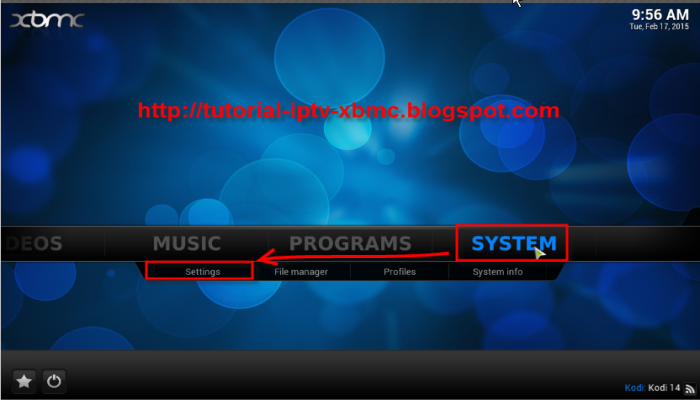
- Select SYSTEM > File Manager
- Select Add Source
- Select None
- Type in the following EXACTLY http://kodi.metalkettle.co
- Select Done
- Select Enter a name for this media source
Give the source a name Metalkettle is an easy name to use
- Select Done
- Select OK
- Go back to your home screen
- SYSTEM > Settings
- Select Add-ons
- Select Install from Zip File
- select metalkettle
- Select repository.metalkettle-1.4.4.zip
- Wait for Add-On Enabled Notification
- Select Get Add-ons
- Select .Metalkettles Addon Repository
- Select Video Add-Ons
- Select Kiddie Cartoons
- Select Install
- Wait for Add-On Enabled Notification
The add-on is now installed
- As usual the add-on now can be accessed via VIDEOS > Add-Ons
- Select Kiddie Cartoons from your home screen.

- 12:31 PM
How To Install Metalkettle Repo And New Add-on Decado Documentaries For Kodi / Xbmc
- Open Kodi / XBMC
- Select SYSTEM > File Manager
- Select Add Source
- Select None
- Type in the following EXACTLY http://kodi.metalkettle.co
- Select Done
- Select Enter a name for this media source
Give the source a name! Metalkettle is an easy name to use
- Select Done
- Select OK
- Go back to your home screen
- SYSTEM > Settings
- Select Add-ons
- Select Install from Zip File
- select metalkettle
- Select repository.metalkettle-1.4.3.zip
- Wait for Add-On Enabl! ed Notification
- Select Get Add-ons
- Select .Metalkettles Addon Repository
- Select Video Add-Ons
- Select Decado Documentaries
- Select Install
- Wait for Add-On Enabled Notification
Decado Documentaries Add-on is now installed.
- As usual the add-on now can be accessed via VIDEOS > Add-Ons
- Select Decado Documentaries from your home screen.
- Stream Engine Add-On For Kodi / Xbmc
Check out my other Kodi / XBMC posts, you never know, you may find something of interest.

- 12:00 PM
How to Install Kaosbox Rep And Add-on NL Sports For Kodi / Xbmc
See how you can install NL Sports the Kodi/XBMC addon which allows you to watch live streaming sports
- Download the NL Sports Repository and save to a location you can easily find later
- Open Kodi / XBMC
- Select SYSTEM > Settings
- Select Add-Ons
- Select Install from zip file
- Navigate to where you downloaded the zip in the first step and select repository.nlsports.zip
- Wait for Add-On Enabled Notification
- Select Get Add-Ons
- Select NL Sports Repository
- Select Video Add-Ons
- Select NL Sports
- Select Install
- Wait for Add-On Enabled Notification
The add-on is now installed
- As usual! the add-on now can be accessed via VIDEOS > Add-Ons
- Select NL Sports from your home screen.
Check out my other Kodi / XBMC posts, you never know, you may find something of interest.